 .
Download notebook.
.
Download notebook.
Rank Histogram#
A rank histogram is a graphical tool for evaluating the reliability of ensemble forecasts, by plotting the relative frequency of an observation’s rank against the sorted values of an ensemble forecast. If an ensemble of forecasts is probabilistically calibrated, then the observations should be statistically indistinguishable from random draws from among the ensemble members, and consequently the rank histogram should be flat.
The tutorial on the probability integral transform (PIT) demonstrates similar and additional tools for assessing calibration, also drawing on the synthetic case studies of this tutorial.
Some characteristic shapes of rank histograms#
In the first part of this tutorial, we look at some classic types of probabilistic (mis)calibration of ensemble forecasts and their characteristic rank histograms.
We consider a process \(Y_t\), where \(t=0, 1, \ldots, m\), defined using independent normal distributions by
For each time step \(t\), the observation \(y_t\) is sampled from the process \(Y_t\) at random.
We consider six different forecasters who issue ensemble forecasts with 10 ensemble members:
Calibrated (ideal) forecaster: ensemble members are sampled from \(N(\mu_t, 1)\).
Over-prediction forecaster: ensemble members are sampled from \(N(\mu_t + 0.3, 1)\). That is, forecast distribution lies to the right of the true distribution.
Under-prediction forecaster: ensemble members are sampled from \(N(\mu_t - 0.3, 1)\). That is, forecast distribution lies to the left of the true distribution.
Over-dispersed forecaster: ensemble members are sampled from \(N(\mu_t, (1.3)^2)\). That is, forecast distribution is wider than the true distribution.
Under-dispersed forecaster: ensemble members are sampled from \(N(\mu_t, (1/1.3)^2)\). That is, forecast distribution is narrower than the true distribution.
Calibrated (marginal) forecaster: ensemble members are sampled from \(N(0, 2)\). That is, this forecast distribution well-calibrated but has no knowledge of \(\mu_t\). This is equivalent to issuing the climatological forecast for a meteorological process. Forecasts are reliable over the long-run but not accurate.
We’ll generate observations and corresponding forecasts and plot their rank histograms.
[1]:
import numpy as np
import xarray as xr
from scipy.stats import norm
import matplotlib.pyplot as plt
from scores.probability import rank_histogram, crps_for_ensemble


n_time = 100000  # total time steps
n_member = 10  # ensemble size
# generate values for mu_t
np.random.seed(seed=42)
mu = norm.rvs(loc = 0, scale = 1, size=n_time)  # mu_t

# broadcast mu_t against ensemble size to create ensemble forecasts
mu_broadcast = np.broadcast_to(mu, (n_member, n_time))

# generate the observations
obs = xr.DataArray(
    data=norm.rvs(loc = mu, scale = 1, size=n_time),
    dims=['time'],
    coords={'time': range(n_time)},
    name='obs',
)

# generate the forecasts
fcstA = xr.DataArray(
    data=norm.rvs(loc = mu_broadcast, scale = 1, size=(n_member,n_time)),
    dims=['ens_member', 'time'],
    coords={'ens_member': range(n_member), 'time': range(n_time)},
    name='calibrated (ideal)',
)
fcstB = xr.DataArray(
    data=norm.rvs(loc = mu_broadcast + 0.3, scale = 1, size=(n_member,n_time)),
    dims=['ens_member', 'time'],
    coords={'ens_member': range(n_member), 'time': range(n_time)},
    name='over-prediction',
)
fcstC = xr.DataArray(
    data=norm.rvs(loc = mu_broadcast - 0.3, scale = 1, size=(n_member,n_time)),
    dims=['ens_member', 'time'],
    coords={'ens_member': range(n_member), 'time': range(n_time)},
    name='under-prediction',
)
fcstD = xr.DataArray(
    data=norm.rvs(loc = mu_broadcast, scale = 1.3, size=(n_member,n_time)),
    dims=['ens_member', 'time'],
    coords={'ens_member': range(n_member), 'time': range(n_time)},
    name='over-dispersed',
)
fcstE = xr.DataArray(
    data=norm.rvs(loc = mu_broadcast, scale = 1 / 1.3, size=(n_member,n_time)),
    dims=['ens_member', 'time'],
    coords={'ens_member': range(n_member), 'time': range(n_time)},
    name='under-dispersed',
)
fcstF = xr.DataArray(
    data=norm.rvs(loc = 0, scale = np.sqrt(2), size=(n_member,n_time)),
    dims=['ens_member', 'time'],
    coords={'ens_member': range(n_member), 'time': range(n_time)},
    name='calibrated (marginal)',
)
fcst = xr.merge([fcstA, fcstB, fcstC, fcstD, fcstE, fcstF])

# generate values for the rank histogram
rank_hist = rank_histogram(fcst, obs, "ens_member")
rank_hist
[1]:
<xarray.Dataset> Size: 616B
Dimensions:                (rank: 11)
Coordinates:
  * rank                   (rank) int64 88B 1 2 3 4 5 6 7 8 9 10 11
Data variables:
    calibrated (ideal)     (rank) float64 88B 0.09099 0.08995 ... 0.08969 0.0921
    over-prediction        (rank) float64 88B 0.1413 0.1203 ... 0.06404 0.05527
    under-prediction       (rank) float64 88B 0.0545 0.06372 ... 0.1214 0.1426
    over-dispersed         (rank) float64 88B 0.05325 0.0787 ... 0.07922 0.05322
    under-dispersed        (rank) float64 88B 0.1403 0.09386 ... 0.09518 0.1395
calibrated (marginal) (rank) float64 88B 0.0905 0.09217 ... 0.09097 0.09148[2]:
# now plot the rank histogram for each forecaster

fig, axes = plt.subplots(2, 3, sharex=True, sharey=True)

for fcst_label, i in zip(list(rank_hist.data_vars), range(6)):
    row, col = int(i / 3), i % 3
    axes[row, col].bar(rank_hist['rank'].values, rank_hist[fcst_label].values, width=1)
    axes[row, col].axhline(y=1/(n_member+1), color='k', linestyle='--')
    axes[row, col].set_title(fcst_label)

plt.subplots_adjust(left=0.1, right=0.9, top=0.9, bottom=0.1, wspace=0.2, hspace=0.3)
fig.text(0.5, 0.01, 'rank', ha='center')
fig.text(-0.01, 0.5, 'relative frequency', va='center', rotation='vertical')

fig.show()
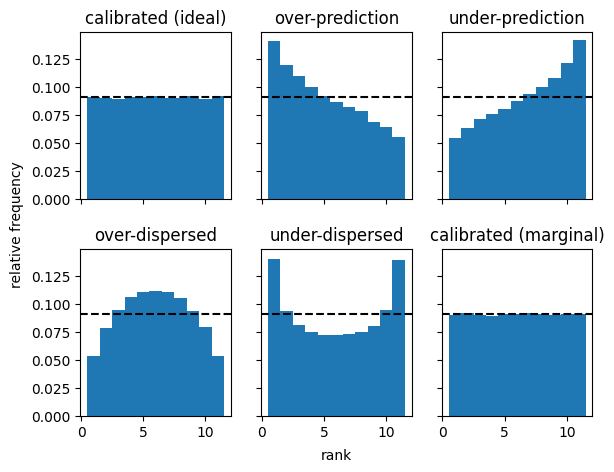
These illustrate basic characteristic shapes of rank histograms.
Calibrated forecasters (ideal and marginal) have flat histograms.
Forecasters with dispersion issues have U-shaped or inverted U-shaped histograms, with too many observations falling either in the centre of the distribution (if over-dispersed) or in the tails of the distribution (if under-dispersed).
Forecasters with bias (over- or under-prediction) have asymmetric histograms.
Note that a flat histogram doesn’t mean that the forecast is more accurate. For example, all four uncalibrated forecasters make better predictions than the calibrated (marginal) forecaster, as measured by the continuous ranked probability score (CRPS), where a lower score indicates a more accurate forecast:
[3]:
crps_for_ensemble(fcst, obs, "ens_member", method='fair')
[3]:
<xarray.Dataset> Size: 48B
Dimensions:                ()
Data variables:
    calibrated (ideal)     float64 8B 0.565
    over-prediction        float64 8B 0.5885
    under-prediction       float64 8B 0.5902
    over-dispersed         float64 8B 0.5755
    under-dispersed        float64 8B 0.5725
calibrated (marginal) float64 8B 0.8005Rank histograms for discontinuous distributions#
The scores implementation of the rank histogram also correctly handles the case where the underlying distributions are discontinuous. With discontinuous distributions, the observation can often match the value of multiple ensemble members, and its rank is then not unique. In such cases, scores.probability.rank_histogram distributes the relative frequency contribution evenly over all possible ranks in the tie.
A classic example of this situation is when forecasting rainfall at a particular location. During a dry spell, a good forecast will have many ensemble members forecasting 0 millimetres of precipitation, and the corresponding observation will also often be 0 mm.
We replicate this kind of situtation by taking the previous example and clipping the forecasts and observations to 0 whenever they have negative values.
[4]:
fcst_clipped = fcst.clip(min=0)
obs_clipped = obs.clip(min = 0)
rank_hist_clipped = rank_histogram(fcst_clipped, obs_clipped, "ens_member")

fig, axes = plt.subplots(2, 3, sharex=True, sharey=True)

for fcst_label, i in zip(list(rank_hist.data_vars), range(6)):
    row, col = int(i / 3), i % 3
    axes[row, col].bar(rank_hist_clipped['rank'].values, rank_hist_clipped[fcst_label].values, width=1)
    axes[row, col].axhline(y=1/(n_member+1), color='k', linestyle='--')
    axes[row, col].set_title(fcst_label)

plt.subplots_adjust(left=0.1, right=0.9, top=0.9, bottom=0.1, wspace=0.2, hspace=0.3)
fig.text(0.5, 0.01, 'rank', ha='center')
fig.text(-0.01, 0.5, 'relative frequency', va='center', rotation='vertical')

fig.show()
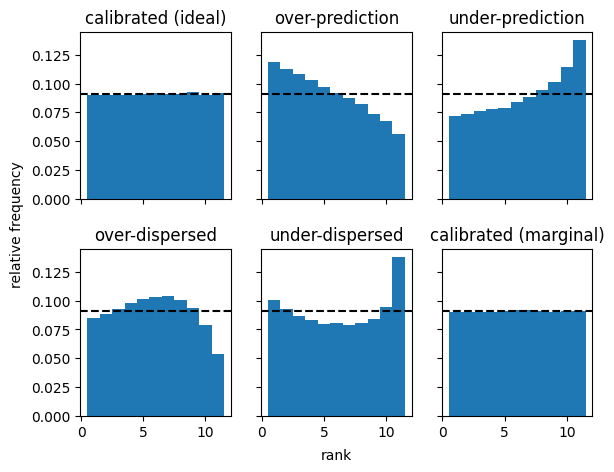
As before, we see that the calibrated forecast systems have flat histograms, even though in many forecast cases the rank of the observation is not unique.
Flat rank histograms do not imply that a forecast system is well-calibrated.#
Hamill (2001) showed that a conditionally mis-calibrated forecast system can have flat histograms. That is, while a calibrated system has an expected flat rank histogram, a flat rank histogram does not imply that the forecast system is well-calibrated. The following is inspired by Hamill’s example and also illustrates how weighting works.
[ ]:
# generate observations for three locations, all from the standard normal distribution N(0,1)
obs = xr.DataArray(
    data=norm.rvs(loc=0, scale=1, size=(3, n_time)),
    dims=['location', 'time'],
    coords={'location': ['city', 'hill', 'valley'], 'time': range(n_time)}
)

# forecasts for the city are under-predictions N(-0.5, 1)
fcst_city = xr.DataArray(
    data=norm.rvs(loc=-0.5, scale=1, size=(n_time, n_member, 1)),
    dims=['time', 'ens_member', 'location'],
    coords={'time': range(n_time), 'ens_member': range(n_member), 'location': ['city']}
)
# forecasts for the hill are over-predictions N(0.5, 1))
fcst_hill = xr.DataArray(
    data=norm.rvs(loc=0.5, scale=1, size=(n_time, n_member, 1)),
    dims=['time', 'ens_member', 'location'],
    coords={'time': range(n_time), 'ens_member': range(n_member), 'location': ['hill']}
)
# forecasts for the valley are over-dispersed N(0, 1.3**2)
fcst_valley = xr.DataArray(
    data=norm.rvs(loc=0, scale=1.3, size=(n_time, n_member, 1)),
    dims=['time', 'ens_member', 'location'],
    coords={'time': range(n_time), 'ens_member': range(n_member), 'location': ['valley']}
)
# combine forecasts into one data array
fcst = xr.concat([fcst_city, fcst_hill, fcst_valley], 'location')

# include some weights - we'll start with equal weighting on city, hill and valley forecasts
weights = xr.DataArray(data=[1, 1, 1], dims=['location'], coords={'location': ['city', 'hill', 'valley']})
rank_hist_weighted = rank_histogram(fcst, obs, "ens_member", reduce_dims='all', weights=weights)

# we now plot the rank histogram for all forecasts combined
fig, axes = plt.subplots(1, 1, figsize=(3, 2))
plt.bar(rank_hist_weighted['rank'].values, rank_hist_weighted.values, width=1)
plt.axhline(y=1/(n_member+1), color='k', linestyle='--')
fig.show()

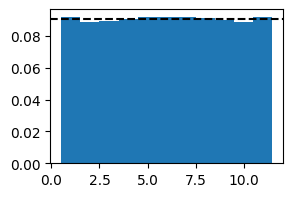
# We get an almost flat histogram
[6]:
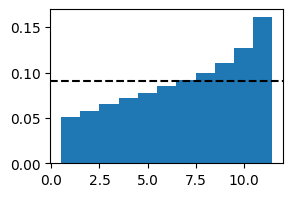
# However, we can expose conditional miscalibration by putting a higher weight on some locations and a lower weight on others.

# For example, here is the rank histogram with a high weight on city forecasts:
weights = xr.DataArray(data=[10, 1, 1], dims=['location'], coords={'location': ['city', 'hill', 'valley']})
rank_hist_weighted = rank_histogram(fcst, obs, "ens_member", reduce_dims='all', weights=weights)

fig, axes = plt.subplots(1, 1, figsize=(3, 2))
plt.bar(rank_hist_weighted['rank'].values, rank_hist_weighted.values, width=1)
plt.axhline(y=1/(n_member+1), color='k', linestyle='--')
fig.show()

# the histogram shows a classic under-prediction signature
[7]:
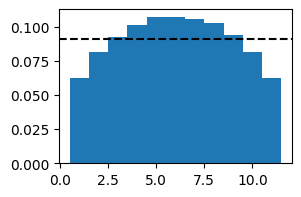
# repeat, but with a high weight on valley forecasts
weights = xr.DataArray(data=[1, 1, 10], dims=['location'], coords={'location': ['city', 'hill', 'valley']})
rank_hist_weighted = rank_histogram(fcst, obs, "ens_member", reduce_dims='all', weights=weights)

fig, axes = plt.subplots(1, 1, figsize=(3, 2))
plt.bar(rank_hist_weighted['rank'].values, rank_hist_weighted.values, width=1)
plt.axhline(y=1/(n_member+1), color='k', linestyle='--')
fig.show()

# the histogram shows a classic over-dispersed signature
Relationship to the Probability Integral Transform (PIT)#
The rank histogram is very closely related to the probabily integral transform (PIT) and PIT histograms.
The scores.probability.Pit implementation of PIT in scores has several advantages over scores.probability.rank_histogram, as it includes:
objective measures of dispersion and bias
an object measure of deviation from ‘calibration’
values for PIT-uniform probability plots, which is another visual tool for diagnosing mis-calibration
forecast cases where there are
NaNvalues among some of the ensemble members by treating such cases as a smaller ensemble (whereasrank_histogramignores all such cases, since the number of ranks cannot vary by forecast case)
However, one possible downside of the scores.probability.Pit implementation is that it treats an ensemble of forecasts as an empirical cumulative distribution function (ECDF). An ensemble may be well-calibrated, but when interpreted as an ECDF it may not be. The rank histogram avoids this problem.
See the tutorial on PIT for further information.
Things to try next#
Can you start with an over-dispersed forecast at one location and an under-dispersed forecast at another location and, by choosing appropriate weightings, produce a combined ranked histogram that is flat?
References#
Hamill, T. M. (2001). Interpretation of rank histograms for verifying ensemble forecasts. Monthly Weather Review, 129(3), 550-560. https://doi.org/10.1175/1520-0493(2001)129%3C0550:IORHFV%3E2.0.CO;2